Installing package dependencies
dnf install -y epel-release
dnf install -y openvpn openssl easy-rsa policycoreutils-python-utils
Creating and Setting Up an OpenVPN Server Certificates
Set of environment variable for easy_rsa
cat <<EOF | tee vars
set_var EASYRSA_ALGO ec
set_var EASYRSA_CURVE prime256v1
set_var EASYRSA_CA_EXPIRE 3650
set_var EASYRSA_CERT_EXPIRE 3650
set_var EASYRSA_CRL_DAYS 3650
EOF
Then execute ./easyresa init-pki
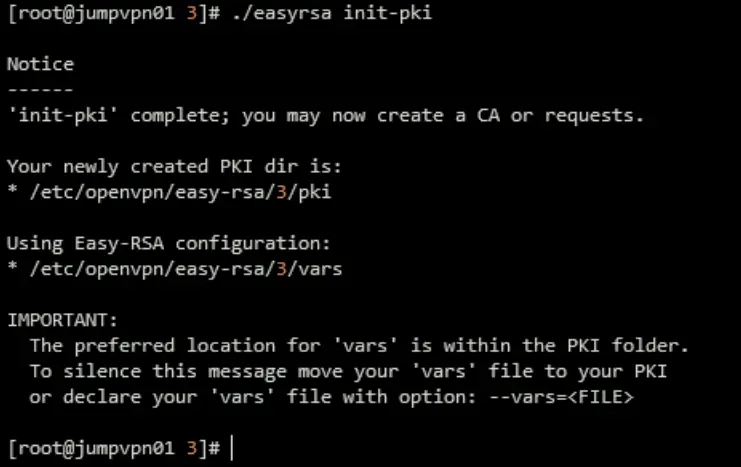
Create certificate authority (CA) and sever certificate.
SERVER_CN=jumpserver
SERVER_NAME=jumpserver

./easyrsa --batch --req-cn="$SERVER_CN" build-ca nopass
./easyrsa --batch build-server-full "$SERVER_NAME" nopass
./easyrsa gen-crl
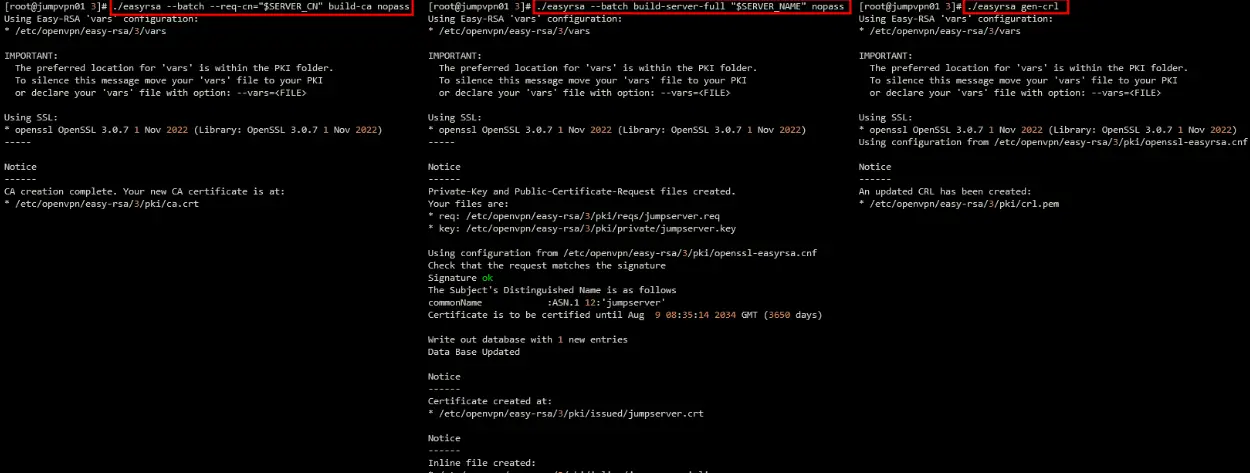
Move all the generated files to /etc/openvpn/certdirectory
mkdir -p /etc/openvpn/cert
cp pki/ca.crt \
    pki/crl.pem \
    pki/private/ca.key \
    "pki/issued/$SERVER_NAME.crt" \
    "pki/private/$SERVER_NAME.key" \
    /etc/openvpn/cert
Generate tls-crypt key to improve security
openvpn --genkey secret /etc/openvpn/server/tls-crypt.key
Generate Server Configuration
The default server configuration is located /usr/share/doc/openvpn/sample/sample-config-files/server.conf
cat <<EOF | tee /etc/openvpn/server/server.conf
port 1194
proto udp
dev tun
user nobody
group nobody
persist-key
persist-tun
keepalive 10 120
topology subnet
server 10.79.83.0 255.255.255.0
push "route 10.79.80.0 255.255.255.0"
push "dhcp-option DNS 10.79.80.254"
push "dhcp-option DOMAIN lab.tworty.id"
client-config-dir /etc/openvpn/client/ccd
ifconfig-pool-persist /etc/openvpn/client/persistent-ip.list
dh none
ecdh-curve prime256v1
auth SHA256
cipher AES-128-GCM
data-ciphers AES-128-GCM
ca /etc/openvpn/cert/ca.crt
cert /etc/openvpn/cert/jumpserver.crt
key /etc/openvpn/cert/jumpserver.key
crl-verify /etc/openvpn/cert/crl.pem
tls-crypt /etc/openvpn/cert/tls-crypt.key
tls-server
tls-version-min 1.2
tls-cipher TLS-ECDHE-ECDSA-WITH-AES-128-GCM-SHA256
status /var/log/openvpn/status.log
log-append /var/log/openvpn/openvpn.log
verb 3
EOF
Insert duplicate-cn to /etc/openvpn/server/server.conf if you need a multiple vpn connection with same CN.
If you are using RHEL, change the group directive from nogroup to nobody to match the distribution’s available groups
Routing, Kernel and firewall configuration
Add routing policy
nmcli device modify eth1 +ipv4.routes "10.79.83.0/24 10.79.80.254"
nmcli connection modify 'System eth1' +ipv4.routes "10.79.83.0/24 10.79.80.254"
Add kernel parameter for ip forwarding
cat <<EOF | tee /etc/sysctl.d/ipv4_forward.conf
net.ipv4.ip_forward = 1
EOF

sysctl -p
Add firewall configuration using firewalld
firewall-cmd --get-active-zones
firewall-cmd --permanent --add-service openvpn
firewall-cmd --permanent --zone=internal --add-source=10.79.80.0/22
firewall-cmd --reload
or spesific port and protocol with firewall-cmd --permanent --add-port=1194/udp
SELinux configuration
semanage port -a -t openvpn_port_t -p udp 1194
if you have any issue with SElinux policy please use audit
sealert -a /var/log/audit/audit.log
ausearch -c 'openvpn' --raw | audit2allow -M openvpn-custom

Generate Client Configuration
The default server configuration is located /usr/share/doc/openvpn/sample/sample-config-files/client.conf
YOUR_IP=$(curl -sL ipinfo.io/ip)
cat <<EOF | tee /etc/openvpn/client/client.ovpn
client
proto udp
explicit-exit-notify
remote $YOUR_IP 1194
dev tun
resolv-retry infinite
nobind
persist-key
persist-tun
remote-cert-tls server
verify-x509-name jumpserver name
auth SHA256
auth-nocache
cipher AES-128-GCM
tls-client
tls-version-min 1.2
tls-cipher TLS-ECDHE-ECDSA-WITH-AES-128-GCM-SHA256
verb 3
EOF
Generate Client Certificate
CLIENT_NAME=jumpserver-client
./easyrsa --batch build-client-full "$CLIENT_NAME" nopass
Insert cerfificate authority file
{ echo "<ca>"
    cat /etc/openvpn/cert/ca.crt
    echo "</ca>"
} | tee -a /etc/openvpn/client/client.ovpn
Insert certificate file
{ echo "<cert>"
    awk '/BEGIN/,/END/' /etc/openvpn/easy-rsa/3/pki/issued/$CLIENT_NAME.crt
    echo "</cert>"
} | tee -a /etc/openvpn/client/client.ovpn
Insert certificate key file
{ echo "<key>"
    cat /etc/openvpn/easy-rsa/3/pki/private/$CLIENT_NAME.key
    echo "</key>"
} | tee -a /etc/openvpn/client/client.ovpn
Insert tls-crypt key file
{ echo "<tls-crypt>"
    awk '/BEGIN/,/END/' /etc/openvpn/cert/tls-crypt.key
    echo "</tls-crypt>"
} | tee -a /etc/openvpn/client/client.ovpn
Now you complete generating client config in /etc/openvpn/client/client.ovpn
Setup logging and logrotate
First we create log directory
mkdir -p /var/log/openvpn
Then create logrotation policy
cat <<EOF | tee /etc/logrotate.d/openvpn
/var/log/openvpn/*.log {
    daily
    missingok
    rotate 7
    compress
    delaycompress
    notifempty
    create 0640 root root
    sharedscripts
    postrotate
        /bin/systemctl reload openvpn-server@server > /dev/null 2>&1 || true
    endscript
}
EOF
Make sure logrotate configuration
logrotate -d /etc/logrotate.d/openvpn
Authentication using Linux PAM and OTP
Here is sample SElinux policy for OpenVPN with Google Authenticator
cat <<EOF | tee openvpn-custom.te
module openvpn-custom 1.0;

require {
    type openvpn_t;
    type user_home_t;
    type auth_home_t;
    type user_home_dir_t;
    class file { create getattr open read rename setattr unlink write };
    class dir { read write add_name remove_name };
}

#============= openvpn_t ==============
# Allow openvpn to access auth_home_t files
allow openvpn_t auth_home_t:file { open read unlink };

# Allow openvpn to access user_home_t directories and files
allow openvpn_t user_home_dir_t:dir { read write add_name remove_name };
allow openvpn_t user_home_t:dir { read write add_name remove_name };
allow openvpn_t user_home_t:file { create getattr open read rename setattr unlink write };
EOF
checkmodule -M -m -o openvpn-custom.mod openvpn-custom.te
semodule_package -o openvpn-custom.pp -m openvpn-custom.mod
semodule -i openvpn-custom.pp
Add context for custom home directory
    semanage fcontext -a -t auth_home_t /home/lab.tworty.id/[^/]+/\.google_authenticator
    semanage fcontext -a -t auth_home_t /home/lab.tworty.id/[^/]+/\.google_authenticator~
    restorecon -rv /home
Installing package and setup PAM policy
dnf install -y google-authenticator qrencode

cat <<EOF | tee /etc/pam.d/openvpn
auth       required     pam_google_authenticator.so forward_pass
auth       include      system-auth
account    include      system-auth
password   include      system-auth
session    include      system-auth
EOF
Replace new server configuration with this values
cat <<EOF | tee -a /etc/openvpn/server/server.conf
port 1194
proto udp
dev tun
user nobody
group nobody
persist-key
persist-tun
keepalive 10 120
topology subnet
server 10.79.83.0 255.255.255.0
push "route 10.79.80.0 255.255.255.0"
push "dhcp-option DNS 10.79.80.254"
push "dhcp-option DOMAIN lab.tworty.id"
client-config-dir /etc/openvpn/client/ccd
ifconfig-pool-persist /etc/openvpn/client/persistent-ip.list
dh none
ecdh-curve prime256v1
auth SHA256
cipher AES-128-GCM
data-ciphers AES-128-GCM
ca /etc/openvpn/cert/ca.crt
cert /etc/openvpn/cert/jumpserver.crt
key /etc/openvpn/cert/jumpserver.key
crl-verify /etc/openvpn/cert/crl.pem
tls-crypt /etc/openvpn/cert/tls-crypt.key
tls-server
tls-version-min 1.2
tls-cipher TLS-ECDHE-ECDSA-WITH-AES-128-GCM-SHA256
status /var/log/openvpn/status.log
log-append /var/log/openvpn/openvpn.log
plugin /usr/lib64/openvpn/plugins/openvpn-plugin-auth-pam.so openvpn
username-as-common-name
duplicate-cn
reneg-sec 0
verb 3
EOF
Update openvpn systemd service file, based on this issue and restart service
cp -r  /usr/lib/systemd/system/[email protected] /etc/systemd/system
sed -i 's/^ProtectHome=true/ProtectHome=false/' /etc/systemd/system/[email protected]
systemctl daemon-reload
systemctl restart [email protected]
Add this configuration to check when create new user or user login must create multi factor authenticator
cat <<EOF | tee -a /etc/skel/.bashrc

if [ ! -f ~/.google_authenticator ]; then
    echo "Google Authenticator configuration file not found."
    echo "Setting up Google Authenticator..."

    if google-authenticator -t -d -f -r 3 -R 30 -W; then
        echo "Google Authenticator has been set up successfully. Please scan the QR code using your authenticator app."
    else
        echo "Error generating the QR code. Please check if google-authenticator is installed correctly and try again."
        exit 1
    fi
else
    echo "Google Authenticator has already been set up."
fi

EOF
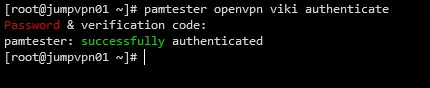
You can test google-authenticator PAM is working or not, you can use pamtester. You need to enter OTP.
dnf install -y pamtester
pamtester openvpn viki authenticate
Generate Client Certificate and Client Configuration
YOUR_IP=$(curl -s ipinfo.io/ip)
CLIENT_NAME=client2fa

cat <<EOF | tee /etc/openvpn/client/client2fa.ovpn
client
proto udp
explicit-exit-notify
remote $YOUR_IP 1194
dev tun
resolv-retry infinite
nobind
persist-key
persist-tun
remote-cert-tls server
verify-x509-name jumpserver name
auth SHA256
auth-nocache
auth-user-pass
cipher AES-128-GCM
tls-client
tls-version-min 1.2
tls-cipher TLS-ECDHE-ECDSA-WITH-AES-128-GCM-SHA256
reneg-sec 0
verb 3
EOF
cd /etc/openvpn/easy-rsa/3
./easyrsa --batch build-client-full "$CLIENT_NAME" nopass
Insert cerfificate authority file
{ echo "<ca>"
    cat /etc/openvpn/server/ca.crt
    echo "</ca>"
} | tee -a /etc/openvpn/client/client2fa.ovpn
Insert certificate file
{ echo "<cert>"
    awk '/BEGIN/,/END/' /etc/openvpn/easy-rsa/3/pki/issued/$CLIENT_NAME.crt
    echo "</cert>"
} | tee -a /etc/openvpn/client/client2fa.ovpn
Insert certificate key file
{ echo "<key>"
    cat /etc/openvpn/easy-rsa/3/pki/private/$CLIENT_NAME.key
    echo "</key>"
} | tee -a /etc/openvpn/client/client2fa.ovpn
Now you complete generating client config in /etc/openvpn/client/client2fa.ovpn
Client Set up
Sent /etc/openvpn/client/client.ovpn file to the user.
References
- https://github.com/google/google-authenticator-libpam
- https://www.digitalocean.com/community/tutorials/how-to-set-up-and-configure-an-openvpn-server-on-centos-8
- https://perfecto25.medium.com/openvpn-community-2fa-with-google-authenticator-4f2a7cb08128
- https://www.ipfire.org/docs/configuration/services/openvpn/extensions/plugins/auth-pam - https://build.openvpn.net/doxygen/group__tls__crypt.html#details
- https://medium.com/@pellabeuf/exploring-diffie-hellman-and-elliptic-curve-diffie-hellman-key-exchange-6b6d882933c2e