Preparation
I used three VM nodes for this project with 8 Cores 8GB Memory and 80GB for the containers storage with operating systems Rocky Linux 9.6 with RKE2 v1.32.5+rke2r1 and Cilium v1.17.3
| Node Hostname | vCPU | Memory | Storage | PrivateNet | Node Roles |
|---|---|---|---|---|---|
| knode01master01 | 8 Core | 8GB | 80GB | 172.16.0.211 | Control-plane |
| knode01master02 | 8 Core | 8GB | 80GB | 172.16.0.212 | Control-plane |
| knode01master03 | 8 Core | 8GB | 80GB | 172.16.0.213 | Control-plane |
| knode01worker01 | 8 Core | 8GB | 80GB | 172.16.0.211 | Worker |
| knode01worker02 | 8 Core | 8GB | 80GB | 172.16.0.212 | Worker |
| knode01worker03 | 8 Core | 8GB | 80GB | 172.16.0.213 | Worker |
All operations use the
rootuser, be careful when running commands!
In this step execution on all nodes
Set static hostname
Set Up environment
NODE_01=knode01master01
NODE_02=knode01master02
NODE_03=knode01master03
NODE_04=knode01worker01
NODE_05=knode01worker02
NODE_06=knode01worker03
NODE_IP01=172.16.0.211
NODE_IP02=172.16.0.212
NODE_IP03=172.16.0.213
NODE_IP04=172.16.0.214
NODE_IP05=172.16.0.215
NODE_IP06=172.16.0.216
then add static hostname in /etc/hosts for all nodes.
cat <<EOF >> /etc/hosts
$NODE_IP01 $NODE_01
$NODE_IP02 $NODE_02
$NODE_IP03 $NODE_03
$NODE_IP04 $NODE_04
$NODE_IP05 $NODE_05
$NODE_IP06 $NODE_06
EOF
Installing packages & dependencies
dnf install -y epel-release
dnf install bash-color-prompt bash-completion \
    nano htop iftop iotop net-tools dnsutils \
    wget curl jq traceroute mtr tcpdump nmap setroubleshoot policycoreutils
Create directory configurations
mkdir -p /etc/rancher/rke2
Cluster Initialization
In this step execution on all master nodes
cat <<EOF | tee /etc/rancher/rke2/config.yaml
node-ip: $(hostname -I | awk '{print $1}')
write-kubeconfig-mode: "0600"
tls-san:
  - "localhost"
  - "127.0.0.1"
cluster-cidr: 10.42.0.0/16
service-cidr: 10.43.0.0/16
# Make a etcd snapshot every 6 hours
etcd-snapshot-schedule-cron: " */6 * * *"
# Keep 56 etcd snapshorts (equals to 2 weeks with 6 a day)
etcd-snapshot-retention: 56
enable-servicelb: false
disable-kube-proxy: true
disable:
  - rke2-ingress
cni: cilium
selinux: true
EOF
Download RKE2 from official repository
curl -sfL https://get.rke2.io | \
INSTALL_RKE2_CHANNEL="v1.32.5+rke2r1" \
RKE2_NODE_NAME=$(hostname -s) \
INSTALL_RKE2_TYPE="server" \
sh -
Set of Cilium Configuration
Create cilium helm values file
cat <<EOF | tee /var/lib/rancher/rke2/server/manifests/rke2-cilium-config.yaml
apiVersion: helm.cattle.io/v1
kind: HelmChartConfig
metadata:
  name: rke2-cilium
  namespace: kube-system
spec:
  valuesContent: |-
    k8sServiceHost: 127.0.0.1
    k8sServicePort: 6443
    kubeProxyReplacement: true
    cni:
      chainingMode: portmap
    localRedirectPolicy: true
    bandwidthManager:
      enabled: true
      bbr: true
    l2announcements:
      enabled: true
      leaseDuration: 15s
      leaseRenewDeadline: 5s
      easeRetryPeriod: 3s
    bpf:
      hostLegacyRouting: false
      masquerade: true
    hubble:
      enabled: false
    ipam:
      mode: kubernetes
    nodeIPAM:
      enabled: true
    enableLBIPAM: true
EOF
For now, we are disabling Hubble to minimize resource usage.
Enable Node Local DNS Cache
NodeLocal DNS Cache with Cilium in kube-proxy replacement mode
cat <<EOF | tee /var/lib/rancher/rke2/server/manifests/rke2-coredns-config.yaml
apiVersion: helm.cattle.io/v1
kind: HelmChartConfig
metadata:
  name: rke2-coredns
  namespace: kube-system
spec:
  valuesContent: |-
    nodelocal:
      enabled: true
      use_cilium_lrp: true
EOF
If all preparation is ready now we start and make service rke2-server to make running at system boot.
systemctl enable --now rke2-server.service
You can troubleshoot/debug with journalctl -xefu rke2-server
Join another control-plane nodes
get token join from first master node in cat /var/lib/rancher/rke2/server/agent-token
cat <<EOF | tee -a /etc/rancher/rke2/config.yaml
node-ip: $(hostname -I | awk '{print $1}')
server: https://$NODE_IP01:9345
token: K10e6528a04f97734c36d94c9b70e699d5f1df3b254c69c2e91bfa896fa03b468c5::server:aae38fe9abdb13aacf5754e4ba40574c
selinux: true
EOF
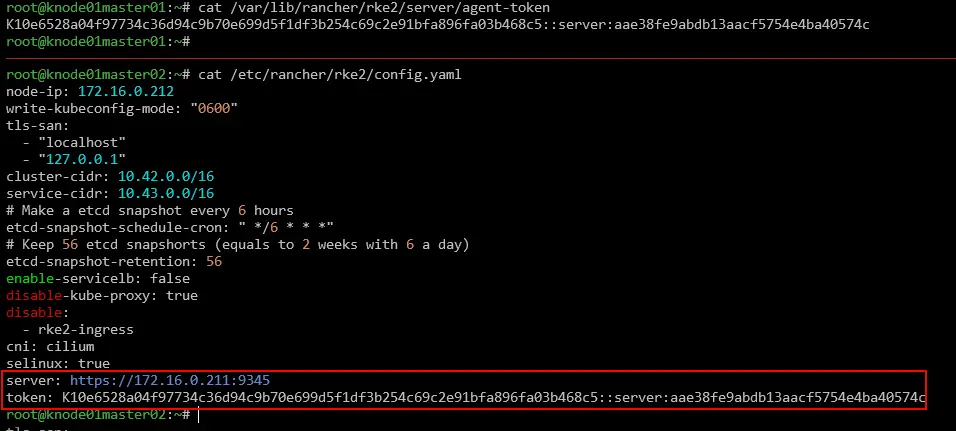 Now we start and make service rke2-server to make running at system boot.
systemctl enable --now rke2-server.service
You can troubleshoot/debug with journalctl -xefu rke2-server
Join another worker nodes
Download RKE2 from official repository
curl -sfL https://get.rke2.io | \
INSTALL_RKE2_CHANNEL="v1.32.5+rke2r1" \
RKE2_NODE_NAME=$(hostname -s) \
INSTALL_RKE2_TYPE="agent" \
sh -
get token join from first master node in cat /var/lib/rancher/rke2/server/agent-token
cat <<EOF | tee -a /etc/rancher/rke2/config.yaml
node-ip: $(hostname -I | awk '{print $1}')
server: https://$NODE_IP01:9345
token: K10e6528a04f97734c36d94c9b70e699d5f1df3b254c69c2e91bfa896fa03b468c5::server:aae38fe9abdb13aacf5754e4ba40574c
selinux: true
EOF
 Now we start and make service rke2-agent to make running at system boot.
systemctl enable --now rke2-agent.service
You can troubleshoot/debug with journalctl -xefu rke2-agent
Accessing the cluster and installing the utility
Create .kube in home directory and copy or link cluster credentials and also set containerd endpoint in /etc/crictl.yaml file.
mkdir ~/.kube
ln -s /etc/rancher/rke2/rke2.yaml ~/.kube/config
ln -s /var/lib/rancher/rke2/agent/etc/crictl.yaml /etc/crictl.yaml
Now installing kubectl, crictl, helm, and cilium binary files.
install /var/lib/rancher/rke2/bin/kubectl /usr/bin/kubectl
install /var/lib/rancher/rke2/bin/crictl /usr/bin/crictl

HELM_VER=$(curl -sL https://get.helm.sh/helm-latest-version)
HELM_FILE=helm-$HELM_VER-linux-amd64.tar.gz
curl -sSL https://get.helm.sh/helm-$HELM_VER-linux-amd64.tar.gz -o $HELM_FILE; tar -zxf $HELM_FILE
install linux-amd64/helm /usr/bin/helm

CILIUM_CLI_VER=$(curl -sL https://raw.githubusercontent.com/cilium/cilium-cli/refs/heads/main/stable.txt)
curl -sSL https://github.com/cilium/cilium-cli/releases/download/$CILIUM_CLI_VER/cilium-linux-amd64.tar.gz -O; tar -zxf cilium-linux-amd64.tar.gz
install cilium /usr/bin/cilium
Set up completion bash to simplify administration.
for i in kubectl crictl helm cilium; do
   $i completion bash | tee /etc/bash_completion.d/$i > /dev/null;
done
source /usr/share/bash-completion/bash_completion
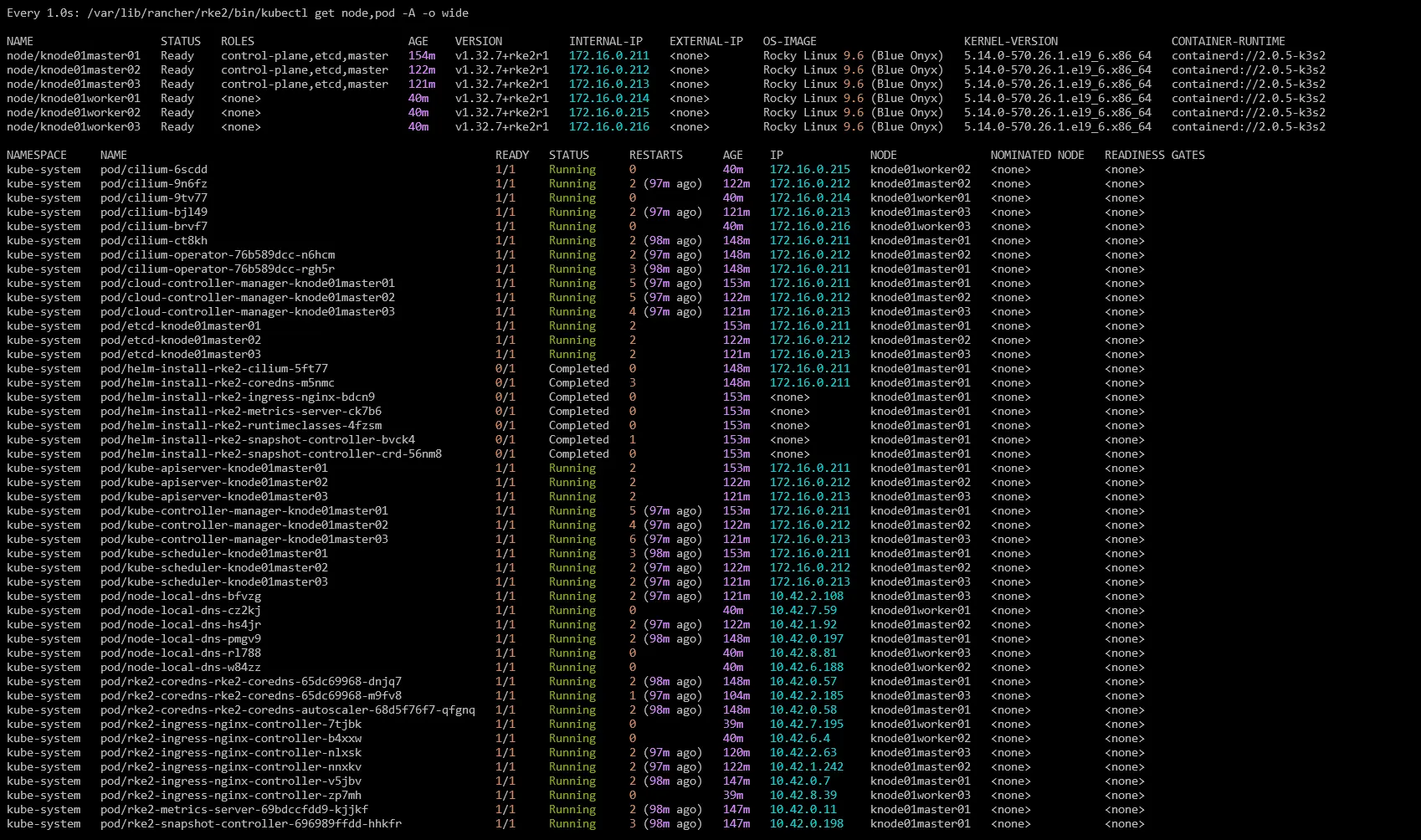
All nodes have joined the cluster, you can see with kubectl get node,pod -A -o wide commands.
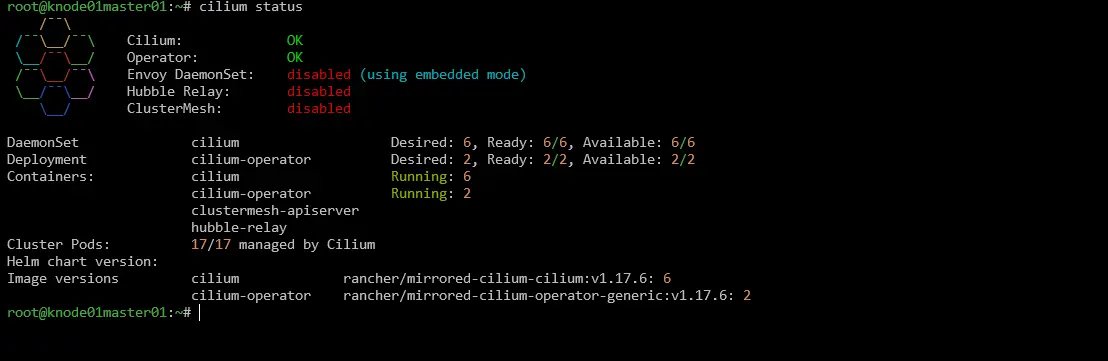
Cilium CNI status.
References
- https://docs.rke2.io/reference/server_config
- https://docs.rke2.io/reference/linux_agent_config
- https://docs.cilium.io/en/stable/installation/cni-chaining-portmap
- https://docs.cilium.io/en/stable/network/l2-announcements/
- https://docs.cilium.io/en/stable/network/node-ipam/
- https://docs.cilium.io/en/stable/network/lb-ipam/
- https://docs.cilium.io/en/stable/network/kubernetes/bandwidth-manager/
- https://docs.cilium.io/en/stable/network/kubernetes/local-redirect-policy/#node-local-dns-cache
- https://cilium.io/blog/2020/06/22/cilium-18/#kubeproxy-removal