Preparation
I used three VM nodes for this home lab project with 4 Cores 4GB Memory and 20GB for the containers storage with operating systems Rocky Linux 9.5 with kubernetes v1.32.5+k3s1 and cri-o v1.32.
| Node Hostname | vCPU | Memory | Storage | PrivateNet |
|---|---|---|---|---|
| litekube01 | 4 Core | 4GB | 20GB | 172.16.0.111 |
| litekube02 | 4 Core | 4GB | 20GB | 172.16.0.112 |
| litekube03 | 4 Core | 4GB | 20GB | 172.16.0.113 |
All operations use the
rootuser, be careful when running commands!
In this step execution on all nodes
Optional: Set SElinux to permissive mode for dev environments
setenforce 0
sed -i 's/^SELINUX=enforcing$/SELINUX=permissive/' /etc/selinux/config
Set static hostname
Set Up environment
NODE_01=litekube01
NODE_02=litekube02
NODE_03=litekube03
NODE_IP01=172.16.0.111
NODE_IP02=172.16.0.112
NODE_IP03=172.16.0.113
then add static hostname in /etc/hosts for all nodes.
cat <<EOF >> /etc/hosts
$NODE_IP01 $NODE_01
$NODE_IP02 $NODE_02
$NODE_IP03 $NODE_03
EOF
Add Repository and Install CRI-O
CRIO_VERSION=v1.32
cat <<EOF > /etc/yum.repos.d/cri-o.repo
[cri-o]
name=CRI-O
baseurl=https://download.opensuse.org/repositories/isv:/cri-o:/stable:/$CRIO_VERSION/rpm/
enabled=1
gpgcheck=1
gpgkey=https://download.opensuse.org/repositories/isv:/cri-o:/stable:/$CRIO_VERSION/rpm/repodata/repomd.xml.key
EOF
Install packages & dependencies
dnf install -y epel-release
dnf install -y container-selinux cri-o
Download and install k3s
curl -sfL https://get.k3s.io | INSTALL_K3S_SKIP_START=true INSTALL_K3S_CHANNEL=v1.32.5+k3s1 sh -s - server
Bootsraping cluster
Execute only in first control-plane node
Create folder /etc/rancher/k3s then create configuration file based on the environmental variables we defined earlier
mkdir -p /etc/rancher/k3s
cat <<EOF | tee /etc/rancher/k3s/config.yaml
cluster-init: true
node-ip: $(hostname -I | awk '{print $1}')
write-kubeconfig-mode: "0600"
tls-san:
  - "localhost"
  - "127.0.0.1"
  - "$NODE_01"
  - "$NODE_IP01"
  - "$NODE_02"
  - "$NODE_IP02"
  - "$NODE_03"
  - "$NODE_IP03"
container-runtime-endpoint: unix:///var/run/crio/crio.sock
cluster-cidr: 10.42.0.0/16
service-cidr: 10.43.0.0/16
# Make a etcd snapshot every 6 hours
etcd-snapshot-schedule-cron: " */6 * * *"
# Keep 56 etcd snapshorts (equals to 2 weeks with 6 a day)
etcd-snapshot-retention: 56
EOF
if everything is ready, run the service and apply it to run when the vm boots
systemctl enable --now k3s.service
Apply Canal CNI (Calico for policy and flannel for networking)
curl -sSL https://raw.githubusercontent.com/projectcalico/calico/v3.30.1/manifests/canal.yaml -o $HOME/canal.yaml
sed -i 's|10.244.0.0/16|10.42.0.0/16|g' $HOME/canal.yaml
cp $HOME/canal.yaml /var/lib/rancher/k3s/server/manifests/canal.yaml
Join another control-plane node to the cluster
Get cluster token in first node in /var/lib/rancher/k3s/server/agent-token looks like this
[root@litekube01 ~]# cat /var/lib/rancher/k3s/server/agent-token
K10bb908f13304637e4547ad7a40edac1c3c25165c6812c65a36f327fb99d33aa86::server:359dbfc03ab8ef930664d10adeb45397
curl -sfL https://get.k3s.io | INSTALL_K3S_SKIP_START=true INSTALL_K3S_CHANNEL=v1.32.5+k3s1 sh -s - server
Same as the first node, create folder /etc/rancher/k3s then create configuration file based on the environmental variables we defined earlier but we add token and server values.
mkdir -p /etc/rancher/k3s
cat <<EOF | tee /etc/rancher/k3s/config.yaml
server: https://$NODE_01:6443
token: K10bb908f13304637e4547ad7a40edac1c3c25165c6812c65a36f327fb99d33aa86::server:359dbfc03ab8ef930664d10adeb45397
node-ip: $(hostname -I | awk '{print $1}')
write-kubeconfig-mode: "0600"
tls-san:
  - "localhost"
  - "127.0.0.1"
  - "$NODE_01"
  - "$NODE_IP01"
  - "$NODE_02"
  - "$NODE_IP02"
  - "$NODE_03"
  - "$NODE_IP03"
container-runtime-endpoint: unix:///var/run/crio/crio.sock
cluster-cidr: 10.42.0.0/16
service-cidr: 10.43.0.0/16
# Make a etcd snapshot every 6 hours
etcd-snapshot-schedule-cron: " */6 * * *"
# Keep 56 etcd snapshorts (equals to 2 weeks with 6 a day)
etcd-snapshot-retention: 56
EOF
Post Bootsraping Cluster
In this step execution on all nodes
PATH update .bashrc file in $HOME/.bashrc and /etc/skel/.bashrc with text editor then adjust like this:
#export PATH
export PATH=$PATH:/usr/local/bin
Create and link or copy cluster credential file.
mkdir -p $HOME/.kube
ln -s /etc/rancher/k3s/k3s.yaml $HOME/.kube/config
Create cri-tools configuration file.
cat <<EOF > /etc/crictl.yaml
runtime-endpoint:  unix:///var/run/crio/crio.sock
image-endpoint:  unix:///var/run/crio/crio.sock
timeout: 10
debug: false
EOF
Installing helm latest version
HELM_VER=$(curl -sL https://get.helm.sh/helm-latest-version)
HELM_FILE=helm-$HELM_VER-linux-amd64.tar.gz
curl -sSL https://get.helm.sh/helm-$HELM_VER-linux-amd64.tar.gz -o $HELM_FILE; tar -zxf $HELM_FILE
mv linux-amd64/helm /usr/local/bin
Update bash completion for easy cluster administration
for i in kubectl crictl helm; do
   $i completion bash | tee /etc/bash_completion.d/$i > /dev/null;
done
source /usr/share/bash-completion/bash_completion
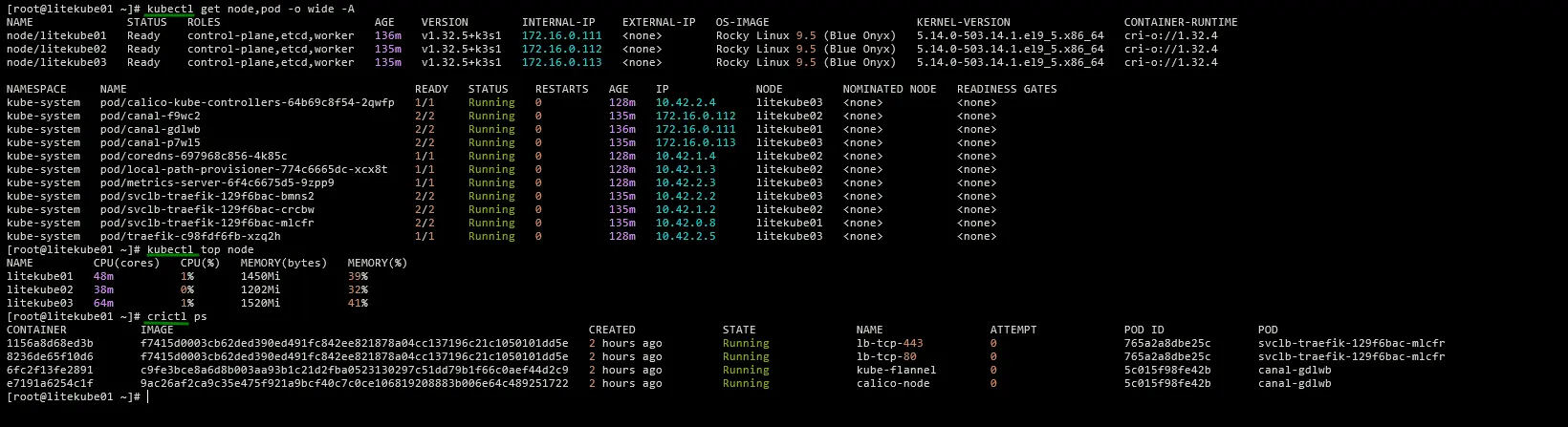
Now you can administrating k3s cluster and debugging kubernetes nodes with crictl looks like this:
Agent/Worker join node to the cluster
When we need horizontal cluster scaling we can add agent/worker nodes. Download and install k3s for agent and copy cluster token in first node $NODE_01 in /var/lib/rancher/k3s/server/agent-token
curl -sfL https://get.k3s.io | INSTALL_K3S_CHANNEL=v1.32.5+k3s1 sh -s - agent --server https://$NODE_01:6443 \
--token K10bb908f13304637e4547ad7a40edac1c3c25165c6812c65a36f327fb99d33aa86::server:359dbfc03ab8ef930664d10adeb45397